

Bunker Connector (Meta Ads)
Syncs CRM contacts into Meta Custom Audiences for advertising campaigns, via Facebook Login for Business.
Meta Platform Integration
This page transparently describes Bunker's application on the Meta platform. The app connects Bunker's CRM (Salesforce) to Meta for two purposes: syncing audiences for advertising campaigns and sending business messages over WhatsApp. Every operation runs on data from Bunker's own CRM, on behalf of Bunker and its clients.
Meta App · WhatsApp Business Platform + Marketing APIOverview
The same app registered with Meta powers two independent integrations. Both operate over the contact base Bunker already maintains in its CRM, and exist to run the marketing and relationship work of Bunker's clients in an organized, auditable way.
Syncs CRM contacts into Meta Custom Audiences for advertising campaigns, via Facebook Login for Business.
Sends business messages, using approved templates, from Bunker's business number to its own contacts.
Integration 1
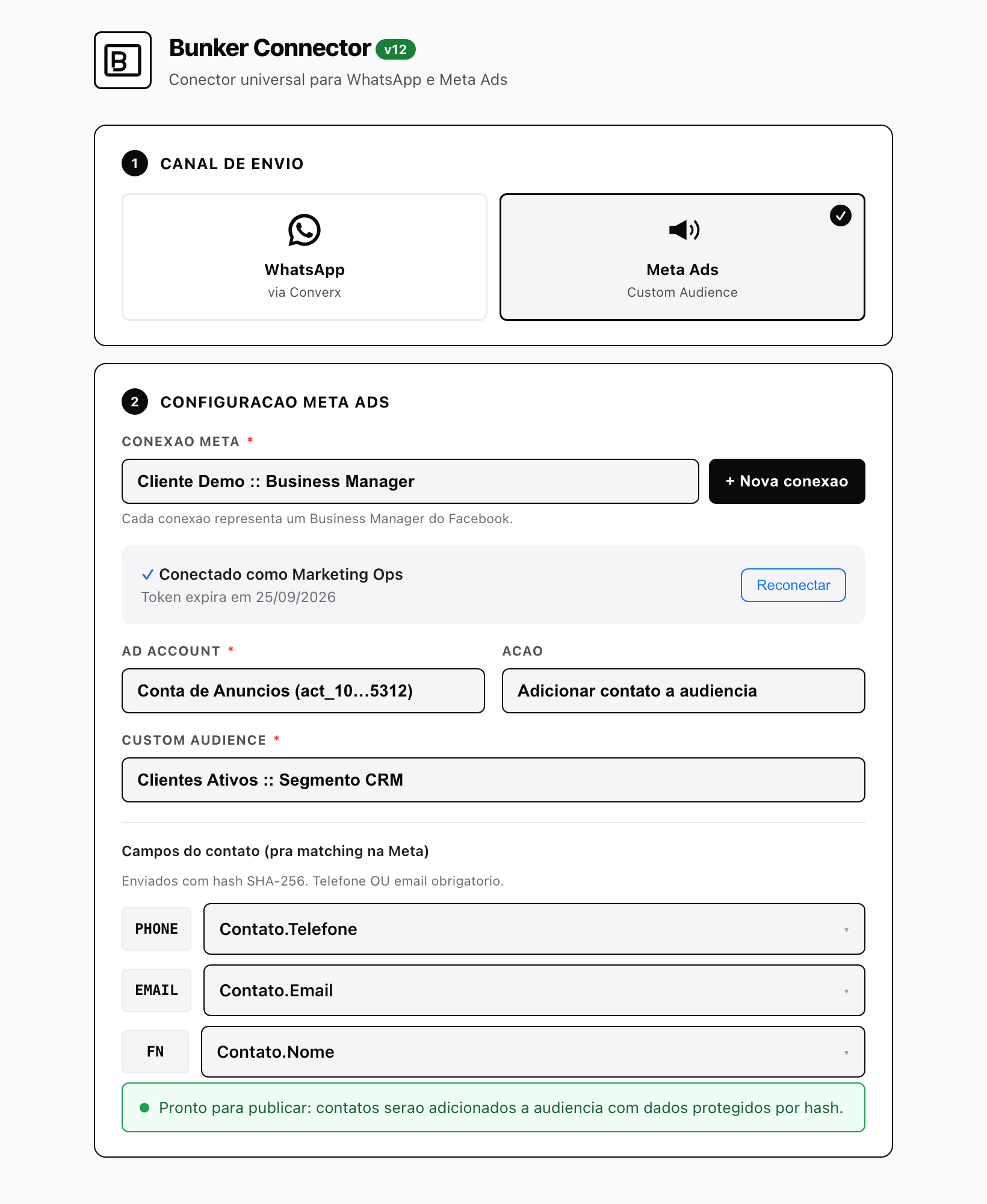
The Bunker Connector is a first-party component (a Journey Builder custom activity plus an admin interface) that connects a Meta business account and keeps a Custom Audience aligned with a CRM segment. It is operated by Bunker's or the client's marketing team, with explicit authentication.
The connection uses the official Facebook Login for Business flow. The user authenticates their own business account and grants the permissions listed below. There is no consumer login and no browsing data collection.
Once connected, the app lists the user's ad accounts and the Custom Audiences within each, so the correct sync destination can be chosen.
Phone, email and name are normalized and SHA-256 hashed inside Bunker's backend before reaching Meta, following the Custom Audiences specification. Bunker never sends personal data in clear text.
The app adds and removes audience members to keep the audience aligned with the CRM segment, honoring opt-out requests. The connection can be revoked at any time.
The connector in practice
The operator chooses the channel (Meta Ads), connects the Meta business account through Facebook Login for Business, selects the ad account and the Custom Audience, and decides whether to add or remove contacts. The fields used for matching (phone, email, name) are sent SHA-256 hashed.
Integration 2
A backend, server-to-server integration that runs from Bunker's CRM straight to Meta's Graph API, authenticated with a System User token. It is send-only (push-only).
Messages are sent from Bunker's verified business number to its own contacts (leads and customers), as part of sales and support operations.
Business-initiated messages use templates approved by Meta, with recipient opt-out handling.
The integration only sends. It does not read conversation history and does not collect recipients' profile data.
This integration uses a System User token, not Facebook Login. Facebook Login for Business is used only by the Bunker Connector, in the advertising integration.
Permissions
The app requests only the permissions needed for the two integrations above. Nothing beyond that.
ads_managementCreate and manage Custom Audiences in the connected ad account and add or remove members (hashed) to run the campaigns.
business_managementAccess the connected Meta business and its ad accounts, so the user can select the correct account and audience.
public_profileRead basic identity (id and name) to show which user is connected.
whatsapp_business_messagingSend approved template messages from the business number.
whatsapp_business_managementManage the WhatsApp Business Account, phone numbers and templates used for sending.
Data and privacy
Bunker does not sell personal data. Data sent to Meta Custom Audiences is SHA-256 hashed before leaving Bunker's systems. WhatsApp messages are sent only to contacts of Bunker and its clients, with an opt-out option. Data is used solely to run the client's marketing and relationship, and access can be revoked at any time by disconnecting the account.
See the full Privacy Policy. Questions about this integration: [email protected].